
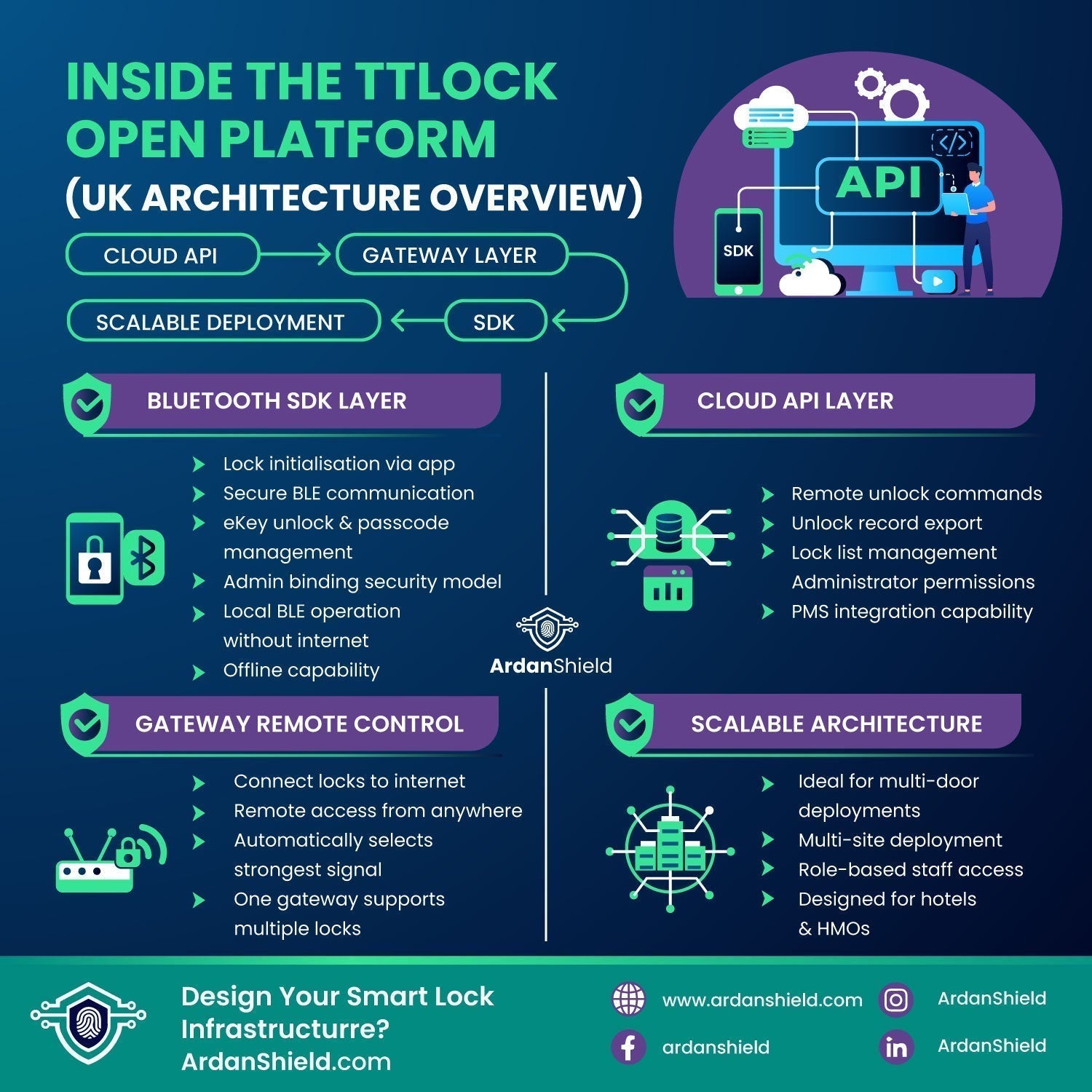

A practical 2026 UK guide for property operators, developers and integrators. This article explains how the TTLock Open Platform works at an architectural level, including SDKs, cloud APIs, gateways, remote unlock logic and data synchronisation.
The TTLock Open Platform is the developer layer of the TTLock ecosystem. While the standard TTLock app allows users to manage locks directly, the Open Platform allows external systems to interact with TTLock infrastructure using structured APIs and SDKs.
This is usually relevant for larger or more technical access-control projects, rather than everyday residential use.
Useful where access needs to connect with wider property workflows.
Can support more advanced hotel, serviced apartment or guest-access workflows where correctly configured.
Relevant where centralised oversight is required across multiple doors or sites.
Used where smart access is part of a wider automation or building-management setup.
One of the most important parts of TTLock architecture is understanding the difference between the mobile SDK and the cloud API. They do different jobs and should not be treated as the same layer.
| Layer | What it does | Typical use |
|---|---|---|
| App SDK | Handles direct Bluetooth communication between a mobile device and the lock. | Scanning nearby locks, lock initialisation, local unlock commands, passcode configuration and reset procedures. |
| Cloud API | Allows server-level systems to communicate with TTLock cloud infrastructure. | Remote unlock commands, eKey management, access logs, lock groups and synchronised account data. |
The App SDK handles direct Bluetooth communication between a mobile device and the lock. It is responsible for scanning for nearby locks, initialising locks, sending local unlock commands, configuring passcodes and handling reset procedures.
Bluetooth protocols are encapsulated within the SDK, so developers do not normally interact directly with low-level BLE commands.
The Cloud API operates at server level. It allows systems to create and revoke eKeys, issue remote unlock commands, pull unlock records, manage lock groups and synchronise data across accounts.
Unlike the SDK, the Cloud API does not communicate directly with the lock. It communicates with TTLock cloud servers, and remote actions normally rely on the correct lock, account and gateway architecture being in place.
For many UK property owners, a gateway is the practical difference between local Bluetooth control and remote access capability. ArdanShield supplies TTLock-compatible smart lock hardware and gateways for suitable setups.
Before a lock can be managed via cloud infrastructure, it must be correctly initialised. This is a key step in any reliable smart lock deployment.
Without correct initialisation, API calls may fail because the device is not properly linked to the account or cloud environment. This step should not be rushed during installations, especially in HMOs, hospitality sites, serviced apartments or multi-door projects.
Bluetooth smart locks cannot communicate with the internet independently. A gateway bridges the gap between the local Bluetooth lock and the internet-connected cloud system.
When a remote unlock command is triggered, the flow typically follows:
Stable broadband, good gateway placement and correct pairing are essential for reliable remote access.
The Open Platform allows unlock logs to be retrieved via API. These records may include timestamp, access method, user identifier and success or failure status.
For UK HMOs, hospitality operators and managed properties, access records may support internal auditing, access reviews and dispute resolution.
The TTLock Open Platform can also support integrations with additional devices, depending on the chosen hardware, software setup and platform access.
Examples can include:
Such integrations may require device broadcast pairing, account binding, API authentication and token-based authorisation. These are usually more relevant to hotels, student accommodation, serviced accommodation and larger commercial buildings.
Cloud API interactions generally rely on authentication methods such as OAuth-style token authentication, application IDs, secret keys and account-level permissions.
Developers should ensure secure server-side storage of credentials. Direct exposure of API credentials in client-side code creates unnecessary security risk.
Store API credentials securely on the server side, not inside public front-end code.
Use account-level permissions carefully and remove access when users no longer need it.
Review logs and access records as part of your operational security process.
The Open Platform is typically required when custom dashboards are being built, PMS integration is needed, large portfolios need centralised oversight, or automated check-in workflows are being implemented.
For standard residential landlords, it is often unnecessary. For enterprise, hospitality or software-integrated deployments, it may become important.
| Use case | Open Platform likely needed? |
|---|---|
| Single home smart lock | Usually no |
| Small rental using app access | Usually no |
| Multi-property dashboard | Often yes |
| Automated hospitality check-in | Potentially yes, depending on the system |
| Custom PMS or software integration | Often yes |
For most UK buyers, the key decision is not whether they need API access. It is whether they need local smart lock control, remote access via gateway, or a more advanced integrated access-control setup.
Usually need a reliable smart lock and simple app control, not Open Platform development.
May benefit from gateway-supported remote access, access logs and better user management.
May require more structured access management, card systems, gateways or integration planning.
For standard smart lock upgrades: browse our smart locks collection.
For remote access setups: view the TTLock Gateway or our wider smart lock accessories.
For hotels and managed accommodation: explore our hotel smart locks collection.
For biometric access: browse facial recognition smart locks.
Managing one door is very different from managing a portfolio, HMO, serviced apartment block or hotel. Send us your door details, lock requirements and whether you need remote access, and we’ll help guide you towards the right ArdanShield setup.
This article explains the structure of the TTLock Open Platform.
ArdanShield supplies TTLock-compatible smart lock hardware. Open Platform access, API credentials and software subscriptions are provided by the TTLock platform owner.
System design should always be based on operational requirements, technical capability and the correct hardware/software setup.
The TTLock Open Platform is a structured access-control infrastructure, not simply a mobile app feature. Understanding how SDK, API and gateway layers interact allows UK operators to design smarter, more reliable access systems.
For many buyers, the most practical starting point is choosing the right smart lock and gateway combination before exploring API-level integration.
Usually not. Most homeowners and small landlords can manage their lock through the standard app and, where needed, a compatible gateway.
The SDK handles direct Bluetooth communication between a mobile device and the lock. The Cloud API works at server level and communicates with TTLock cloud infrastructure.
For Bluetooth locks, remote unlock normally requires a gateway to bridge the lock to the internet. Without a gateway, control is usually local through Bluetooth.
They can be used in certain hospitality or serviced accommodation setups, depending on the lock model, gateway setup, software requirements and operational needs.
ArdanShield supplies TTLock-compatible smart lock hardware. Open Platform access, API credentials and software subscriptions are provided by the TTLock platform owner.
Yes. ArdanShield can help you consider suitable smart locks, gateways and accessories for your UK property setup.
Explore ArdanShield’s smart lock range, gateways and accessories designed for UK homes, landlords, rentals and hospitality projects.
Explore Smart Locks