

TTLock Gateway Offline? Common Fixes for UK Smart Locks
A TTLock gateway going offline can stop remote unlock features, delay guest access and cause frustration for homeowners, Airbnb hosts and property managers. The good news is that most TTLock gateway issues are usually caused by setup, WiFi or placement problems rather than hardware failure.
Quick Answer
If your TTLock gateway shows offline, first check power, internet connection, 2.4GHz WiFi compatibility, gateway placement and Bluetooth pairing. In many cases, moving the gateway closer to the lock or router resolves the issue. Remote unlock features usually require both the gateway and lock to maintain stable communication.
Why TTLock Gateways Go Offline
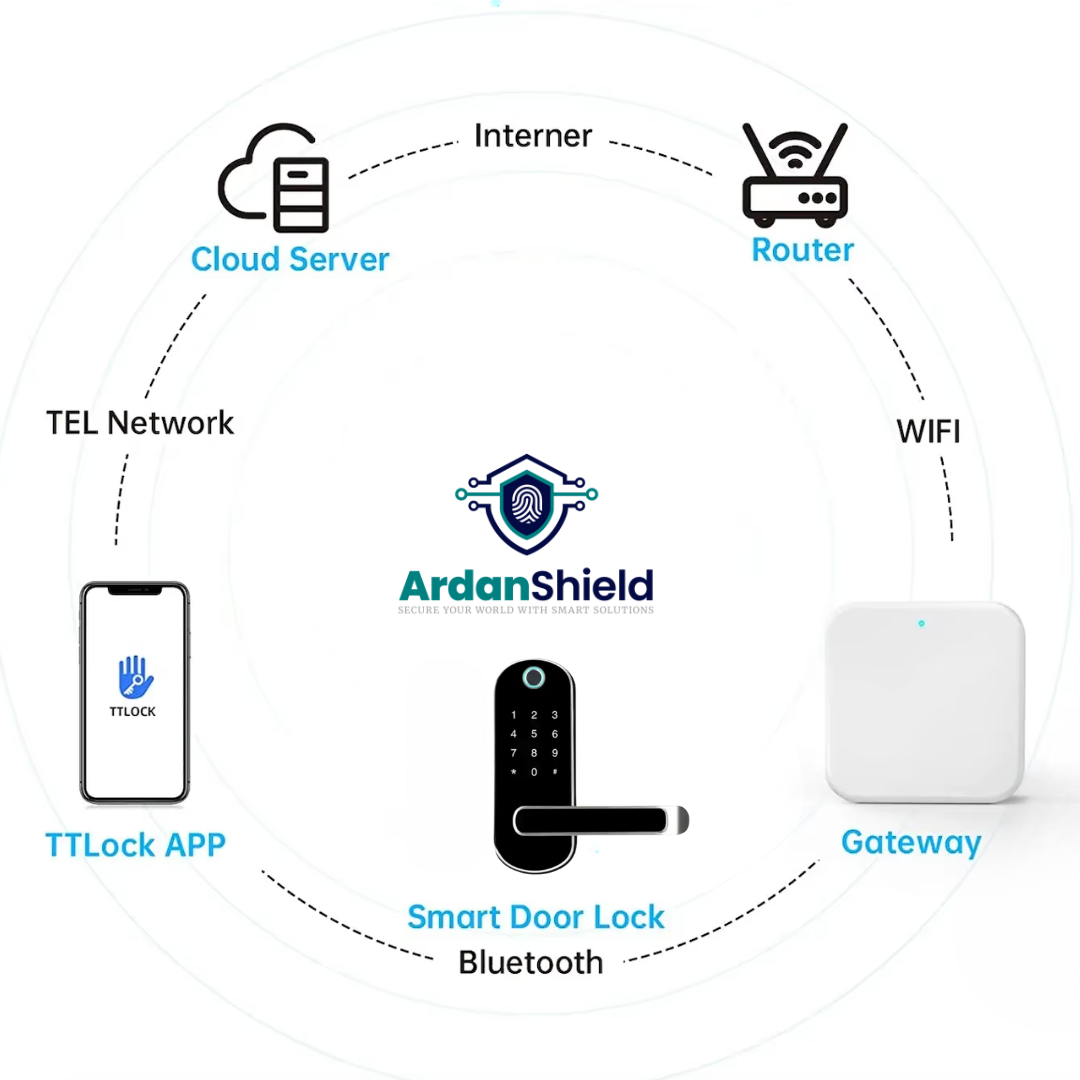
A TTLock gateway works as the bridge between your smart lock and the internet. If the gateway loses connection to the router, loses power or cannot communicate with the lock, remote functions may stop working.
Weak WiFi signal
The gateway may be too far from the router or blocked by thick walls.
Gateway too far from lock
Bluetooth communication between the lock and gateway has limited range.
Wrong WiFi band
Many TTLock gateways require 2.4GHz WiFi during setup.
Router changes
Changing router names, passwords or settings can disconnect the gateway.
Power interruptions
USB power adapters or sockets may be unstable or accidentally switched off.
Internet outages
If broadband fails, remote access features may stop temporarily.
Quick Fixes to Try First
- Unplug the gateway for 30 seconds and reconnect it.
- Check the WiFi router is online and internet is working normally.
- Confirm the gateway is connected to a compatible network.
- Move the gateway closer to the lock temporarily and retest.
- Check whether the TTLock app can still see the lock locally through Bluetooth.
- Restart your phone and reopen the TTLock app.
- Check whether the lock batteries are low.
- Remove and re-add the gateway if setup appears corrupted.
Important
If Bluetooth works locally beside the lock but remote unlock fails, the issue is usually gateway or internet related rather than the lock itself.
2.4GHz vs 5GHz WiFi Explained
This is one of the most common causes of TTLock gateway problems in UK homes.
| WiFi Type | What to know | Common issue |
|---|---|---|
| 2.4GHz | Longer range and commonly used for smart home devices. | Usually required during TTLock gateway setup. |
| 5GHz | Faster speeds but shorter range. | Some gateways may not support setup on 5GHz-only networks. |
| Dual-band routers | Broadcast both network types. | Phones may connect to the wrong band during setup. |
ArdanShield’s newer ConnectHub™ 5G Smart Gateway supports 5GHz-compatible setups, which can help simplify some installations where supported.
Why Remote Unlock Stops Working
Remote unlock relies on several things working together:
- The smart lock must be powered and responsive.
- The gateway must be online.
- The lock must maintain Bluetooth communication with the gateway.
- The internet connection must be active.
- TTLock cloud communication must be functioning normally.
Good troubleshooting habit
Always test local Bluetooth unlock first. If local control works beside the lock but remote unlock fails, focus on the gateway or internet side of the setup.
Best Gateway Placement Tips
Keep it nearby
Gateways work best when relatively close to the lock.
Avoid thick walls
Stone walls, metal doors and utility cupboards can weaken signals.
Use stable power
Avoid loose USB sockets or switched extension leads.
Check WiFi coverage
Run a WiFi speed or signal test where the gateway will sit.
Test before guests arrive
Airbnb hosts should always test remote access before check-in day.
Restart after router changes
New routers or password changes often require gateway reconnection.
Recommended TTLock Gateways

Need Help Fixing a TTLock Gateway?
ArdanShield can help you troubleshoot gateway placement, WiFi setup, lock compatibility and remote unlock issues.
Contact ArdanShieldBrowse AccessoriesWhat This Means for UK Users
Many UK gateway issues are caused by modern routers automatically switching between 2.4GHz and 5GHz networks. Airbnb hosts, serviced accommodation operators and remote property managers should test their gateway setup thoroughly before relying on remote unlock features.
Common Mistakes to Avoid
- Placing the gateway too far from the lock
- Using unstable USB power supplies
- Trying setup while connected to the wrong WiFi band
- Ignoring low lock batteries
- Assuming internet outages will not affect remote functions
- Not testing remote unlock before guests arrive
Related ArdanShield Guides
TTLock Remote Unlock Not Working
Fix remote unlock issues caused by gateway, WiFi, Bluetooth, battery or permission problems.
Read the guideTTLock Troubleshooting Guide
General troubleshooting for TTLock Bluetooth, PIN, WiFi and app issues.
Read the guideTTLock Passcodes Explained
Understand timed, permanent, recurring and one-time TTLock passcodes.
Read the guideDo Smart Locks Work Without WiFi?
Learn what works locally and what needs gateway or internet access.
Read the guideBest Smart Locks for Airbnb UK
Compare smart locks, gateways, lock boxes and self check-in workflows for UK Airbnb hosts.
Read the guideAirbnb Self Check-In with TTLock
Learn how TTLock-compatible smart locks can support guest self check-in and timed access.
Read the guideSmart Lock Battery Failure Guide
Understand battery warnings, backup access and how to prevent guest lockouts.
Read the guideTTLock Gateway Offline FAQs
Why does my TTLock gateway keep going offline?
The most common causes are weak WiFi, poor gateway placement, unstable power or router configuration issues.
Can TTLock work without a gateway?
Yes, many locks can still work locally through Bluetooth, but remote management features usually require a gateway.
Does TTLock need 2.4GHz WiFi?
Many TTLock gateways use 2.4GHz during setup. Always check the gateway specification before installation.
Why does Bluetooth unlock still work?
Bluetooth control works locally between your phone and the lock, while remote unlock depends on the gateway and internet connection.
Can thick walls affect TTLock gateways?
Yes. Stone walls, brickwork, metal doors and long distances can weaken communication between the gateway and lock.
Improve Your Smart Lock Connectivity
Explore ArdanShield TTLock gateways, smart locks and remote access solutions for homes, rentals, HMOs and hospitality properties across the UK.
Browse GatewaysView Smart Locks